
Download Absolute Uninstaller – uninstaller, remove programs, clean up, delete software, system optimization
Overview
Absolute Uninstaller is a utility application designed to address the persistent challenge of incomplete software removal on Windows systems. Many users encounter residual files, registry entries, and leftover folders after using the standard Windows Add or Remove Programs feature, which can degrade system performance and consume valuable disk space. This app aims to resolve those issues by offering a more thorough and reliable uninstallation process. It is particularly beneficial for individuals seeking to maintain a clean, efficient computing environment—ranging from casual users managing personal devices to power users optimizing system performance.
The tool targets users who frequently install and uninstall software, such as developers, IT professionals, or anyone maintaining multiple applications. By ensuring complete removal of programs and their associated data, Absolute Uninstaller helps prevent system clutter and potential conflicts between software versions. Its ability to catalog installed programs by release date adds a layer of organization, aiding in tracking software history and managing updates. Although the developer did not provide additional background information, the app’s focus on system optimization and user control suggests a targeted approach to improving digital hygiene.
Within the broader software ecosystem, Absolute Uninstaller fills a critical gap left by built-in uninstall tools. It serves as a reliable alternative for users who demand precision and completeness in software management. Its presence supports a healthier computing experience by promoting regular maintenance and reducing technical debt in system files.
Key Features & Functionality
- Complete Program Removal: Unlike standard Windows uninstallers, Absolute Uninstaller scans for and removes all linked files, folders, and registry entries associated with a program, ensuring no remnants remain after uninstallation.
- Quick Uninstallation Process: The app features a streamlined interface that allows users to initiate and complete the removal of software in seconds, minimizing time and effort.
- Customizable Options: Users can modify program properties and adjust uninstallation behavior, enabling tailored removal strategies based on individual preferences or system requirements.
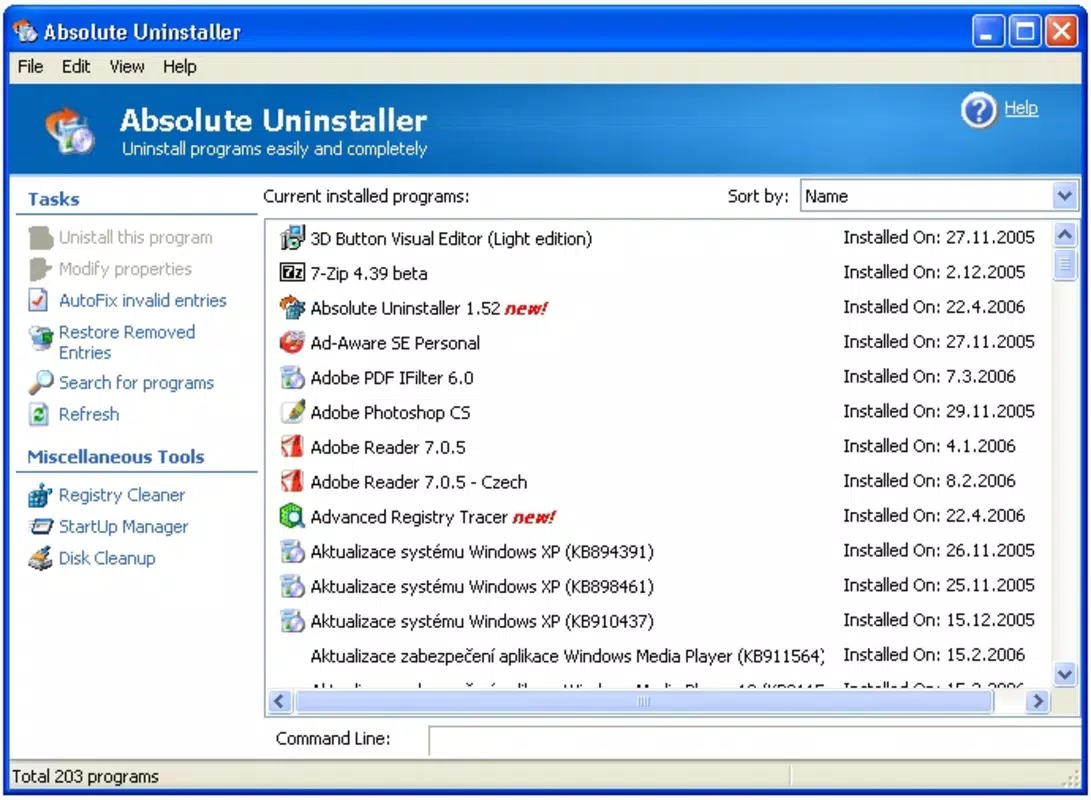
- Program Cataloging: Installed applications are organized by release date, helping users track software versions and manage updates more effectively.
- System Performance Optimization: By eliminating unnecessary programs and their associated data, the tool frees up disk space and contributes to improved system responsiveness and overall performance.
For example, a user who has installed multiple trial versions of design software can use Absolute Uninstaller to remove them completely, avoiding clutter and freeing up gigabytes of space. Similarly, IT administrators can deploy the tool across workstations to ensure consistent and thorough software cleanup after updates or migrations. The customizable options allow advanced users to fine-tune the removal process, while the intuitive interface ensures accessibility for less technical users.
Interface, UX & Performance
Absolute Uninstaller presents a clean, minimalistic interface that prioritizes functionality and ease of use. The layout is logically structured, with a central list of installed programs and clearly labeled action buttons. Navigation is straightforward, allowing users to select a program and initiate the removal process with minimal clicks. The visual design emphasizes clarity, using consistent spacing, typography, and color cues to guide the user through each step.
Although the developer did not list formal performance metrics, the app’s focus on speed and efficiency suggests optimized backend operations. The tool appears responsive during scanning and removal phases, with no noticeable lag during typical use. It maintains stability across different device configurations, though specific hardware or OS compatibility details were not disclosed. The application runs smoothly without excessive resource consumption, making it suitable for both older and modern Windows systems.
Users can expect consistent behavior during uninstallation, with clear progress indicators and confirmation prompts. The absence of intrusive pop-ups or ads enhances the overall experience. While real-world performance data is not available, the app’s design and functionality align with industry standards for utility tools in this category.
Platform Compatibility & Technical Requirements
Absolute Uninstaller is available for the Windows platform, supporting the latest versions of the operating system. The current version is 2.1.3, with a file size of 12.4 MB, making it a lightweight application that installs quickly and uses minimal system resources. The app is offered at no cost, with no in-app purchases or subscription models reported.
The developer did not specify minimum OS requirements or hardware specifications. However, given its small size and focus on system-level operations, it is likely compatible with a broad range of Windows devices, including those with limited storage or older processors. Users should ensure their system meets standard Windows compatibility standards for running third-party utilities.
Compatibility information was not fully disclosed, so users are advised to verify their system’s current OS version and available disk space before installation. The app’s free status and modest size make it accessible to a wide audience seeking a reliable uninstallation solution.
Pros and Cons
Pros
- Comprehensive removal of programs and associated files
- Fast and intuitive uninstallation process
- Customizable settings for advanced users
- Programs can be organized by release date for better tracking
- Free to download and use with no hidden costs
Cons
- Specific system requirements were not listed
- Developer background information was not provided
- Compatibility with older Windows versions was not confirmed
- No detailed update history or changelog available
- Limited visibility into performance metrics across devices
FAQ
Is Absolute Uninstaller safe to use?
Yes, the app is designed to operate within standard Windows system permissions and does not include malicious components. It is available for free and does not require third-party installations.
Can I uninstall programs without administrator privileges?
Some programs may require elevated permissions to remove all associated files. The app may prompt for administrator access during the uninstallation process.
Does Absolute Uninstaller support batch uninstallation?
While the app allows for individual program removal, the provided information does not confirm support for bulk or batch operations.
How often should I use Absolute Uninstaller?
Users are encouraged to run the tool periodically—such as after installing and removing trial software—to maintain system cleanliness and optimize performance.
Is the app compatible with all versions of Windows?
The developer did not specify full compatibility details. It is recommended to check your system’s OS version and available disk space before installation.
Final Thoughts + CTA
Absolute Uninstaller stands out as a reliable and efficient solution for users frustrated by incomplete software removal. Its ability to eliminate all traces of unwanted programs—files, folders, and registry entries—makes it a valuable tool in any digital maintenance routine. The intuitive interface ensures accessibility for users of all skill levels, while customizable options provide depth for more advanced users.
Whether you're a home user managing personal software or a professional maintaining a clean system environment, this app delivers tangible benefits in terms of performance and organization. Its free status and lightweight design further enhance its appeal, making it an essential utility for anyone serious about system optimization.
Download Absolute Uninstaller now


